Hardware

Create an insert key on a HP Elitebook 1040G4

3 minute read Modified:

No insert key

At my work I got a new laptop (HP Elitebook 1040 G4), which has a great performance, but is missing an insert key.
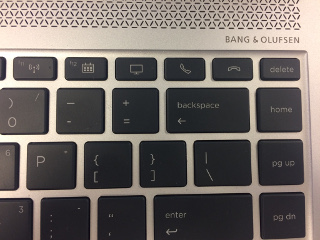
At least there are some extra keys on the keyboard I don’t use (pickup and hangup the telephone), so I decided to map one of those keys to create an insert key.

How to recognize the key

First I had to find out which keycode the key generated. Luckily it wasn’t mapped at all, so syslog mentioned the following when I pressed the hangup-key:

kernel: [ 2455.465336] atkbd serio0: Unknown key pressed (translated set 2, code 0x65 on isa0060/serio0).
kernel: [ 2455.465342] atkbd serio0: Use 'setkeycodes 65 <keycode>' to make it known.
kernel: [ 2455.555867] atkbd serio0: Unknown key released (translated set 2, code 0x65 on isa0060/serio0).
kernel: [ 2455.555868] atkbd serio0: Use 'setkeycodes 65 <keycode>' to make it known.

Then I looked at the Archwiki and followed some of the steps. But the location of the default hwdb.d files in xubuntu is in /lib/udev/hwdb.d, which is different from Arch Linux. The default keyboard file (/lib/udev/hwdb.d/60-keyboard.hwdb) has a description how to update the udev config.

I manually tried to set the value with

setkeycodes 65 110
which resulted in a insert key in the terminal window.

EdgeRouter: merge error: SSL peer certificate or SSH remote key was not OK

3 minute read Modified:

merge does not work via scp

When I was testing something with my EdgeRouter Lite, I saw some command that might help me create a config outside the router itself and then load it. One of them was the merge command, so I tried to use it. The help information on the CLI was the following:

# merg<tab><tab>
Possible completions:
  merge         Load configuration from a file and merge running configuration
      
[edit]
# merge <tab>
Possible completions:
  <Enter>                               Merge from system config file
  <file>                                Merge from file on local machine
  scp://<user>:<passwd>@<host>/<file>   Merge from file on remote machine
  ftp://<user>:<passwd>@<host>/<file>   Merge from file on remote machine
  http://<host>/<file>                  Merge from file on remote machine
  tftp://<host>/<file>                  Merge from file on remote machine

      
[edit]
#

Per Interface vs. Zone Based Firewall (backup)

4 minute read Modified:

Why this item

When I was searching how to setup my new EdgeRouter Lite, I came across a link that would explain why using a zone based firewall is better than a per-interface firewall. Unfortually the webpage was no longer reachable, but at least google cache still had the text available. Because it is a good article, I put the text here as a backup. The original also has some pictures as can be seen by the archived page.

Per Interface vs. Zone Based Firewall

Every so often, I get asked the question of why I feel a Zone based firewall is better than a per-interface firewall. It can be a complicated question to answer depending on the asker’s level of understanding. So my goal here is to provide a simple and clear description of why a zone based firewall is the more secure solution.

In all firewall variants, we do matching against multiple attributes of a packet. Source IP, Source Port, Destination IP, Destination Port, session state, protocol and various other logical values depending on the implementation. The primary difference between ACLs and Zones are how they apply to the physical or layer 2 characteristics.

eth0: mismatched read page pointers 4c vs ff

2 minute read Modified:

The situation

I still have an old 486SX25 system which I use to run multiple ssh sessions to different other systems. For instance to use IRC or view email. This way I can keep track of those things when doing things in fullscreen on my main desktop. The system started showing the following error on every virtual console:

eth0: mismatched read page pointers 4c vs ff

After a time I saw the connections to other systems fail.

Recent posts
- full list -