Why does(n't) it work?

Hugo as new blog software

3 minute read Published:

Why the change?

Previously I used flatpress for hosting this blog. But the software was already quite old and recently it was announced that it was officially dead. So I had to find a new way to publish my blogs. I liked flatpress because it didn’t need a database and used plain text files to store the information. The news item of flatpress being dead mentioned static gen, which create static websites. So I decided to look at those and chose hugo.

perl: warning: Setting locale failed.

2 minute read Modified:

Why does this happen?

When I logged in from my laptop to nameserver and ran nsvi, I got the following message:

perl: warning: Setting locale failed.
perl: warning: Please check that your locale settings:
        LANGUAGE = "en_US:en",
        LC_ALL = (unset),
        LC_MEASUREMENT = "nl_NL.UTF-8",
        LC_PAPER = "nl_NL.UTF-8",
        LC_MONETARY = "nl_NL.UTF-8",
        LC_NAME = "nl_NL.UTF-8",
        LC_ADDRESS = "nl_NL.UTF-8",
        LC_NUMERIC = "nl_NL.UTF-8",
        LC_TELEPHONE = "nl_NL.UTF-8",
        LC_IDENTIFICATION = "nl_NL.UTF-8",
        LC_TIME = "nl_NL.UTF-8",
        LANG = "en_US.UTF-8"
    are supported and installed on your system.
perl: warning: Falling back to a fallback locale ("en_US.UTF-8").

But when I login from my normal computer, this does not happen.

During the search of a solution I found it was easy to trigger by using a simple perl command:

perl -e exit

Create an insert key on a HP Elitebook 1040G4

3 minute read Modified:

No insert key

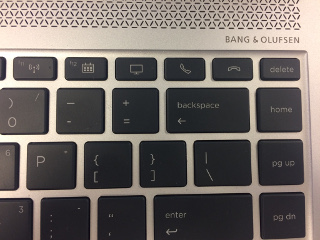
At my work I got a new laptop (HP Elitebook 1040 G4), which has a great performance, but is missing an insert key.

At least there are some extra keys on the keyboard I don’t use (pickup and hangup the telephone), so I decided to map one of those keys to create an insert key.

How to recognize the key

First I had to find out which keycode the key generated. Luckily it wasn’t mapped at all, so syslog mentioned the following when I pressed the hangup-key:

kernel: [ 2455.465336] atkbd serio0: Unknown key pressed (translated set 2, code 0x65 on isa0060/serio0).
kernel: [ 2455.465342] atkbd serio0: Use 'setkeycodes 65 <keycode>' to make it known.
kernel: [ 2455.555867] atkbd serio0: Unknown key released (translated set 2, code 0x65 on isa0060/serio0).
kernel: [ 2455.555868] atkbd serio0: Use 'setkeycodes 65 <keycode>' to make it known.

Then I looked at the Archwiki and followed some of the steps. But the location of the default hwdb.d files in xubuntu is in /lib/udev/hwdb.d, which is different from Arch Linux. The default keyboard file (/lib/udev/hwdb.d/60-keyboard.hwdb) has a description how to update the udev config.

I manually tried to set the value with

setkeycodes 65 110
which resulted in a insert key in the terminal window.
How to tcpdump only IPv6 ping packets

3 minute read Modified:

IPv6 upper-layer protocol is not supported by proto[x]

When I was setting up a new system it was configured to have 2 IPv6 addresses. One fixed IPv6 address and one IPv6 via automatic configuration. I wanted to know which IPv6 address was used for as default, so I started tcpdump on a different host with IPv6. But this resulted in a lot of traffic.

root@nynaeve:~# tcpdump -nni eth0 icmp6
tcpdump: verbose output suppressed, use -v or -vv for full protocol decode
listening on eth0, link-type EN10MB (Ethernet), capture size 262144 bytes
14:36:29.233603 IP6 fe80::4:1 > ff02::1:ff00:1: ICMP6, neighbor solicitation, who has 2a01:8:4:5::1, length 32
14:36:29.234108 IP6 fe80::4:1 > ff02::1:ff00:1: ICMP6, neighbor solicitation, who has 2a01:8:4:f::1, length 32
14:36:29.234119 IP6 fe80::4:1 > ff02::1:ff00:1: ICMP6, neighbor solicitation, who has 2a01:8:4:4::1, length 32
14:36:29.234122 IP6 fe80::4:1 > ff02::1:ff00:1: ICMP6, neighbor solicitation, who has 2a01:8:4:e::1, length 32
14:36:29.234215 IP6 fe80::4:1 > ff02::1:ff00:1: ICMP6, neighbor solicitation, who has 2a01:8:4:c::1, length 32
14:36:29.234337 IP6 fe80::4:1 > ff02::1:ff00:1: ICMP6, neighbor solicitation, who has 2a01:8:4:1::1, length 32
14:36:29.250866 IP6 fe80::5054:ff:feac:88c2 > ff02::1:ffea:c8c5: ICMP6, neighbor solicitation, who has fe80::6600:6aff:feea:c8c5, length 32
14:36:29.683534 IP6 fe80::4:1 > ff02::1:ff00:1: ICMP6, neighbor solicitation, who has 2a01:8:4:1::1, length 32
14:36:29.683772 IP6 fe80::4:1 > ff02::1:ff00:1: ICMP6, neighbor solicitation, who has 2a01:8:4:6::1, length 32

With that much traffic it is hard to see which my ICMP6 packets are my ping packets. And since I can’t filter on IPv6 address. Because I don’t know which IPv6 address will be used. So I wanted to filter on ICMP6 echo request and reply packages.

root@nynaeve:~# tcpdump -nni eth0 icmp6[0]=128
tcpdump: IPv6 upper-layer protocol is not supported by proto[x]
root@nynaeve:~#
Recent posts
- full list -