No insert key
At my work I got a new laptop (HP Elitebook 1040 G4), which has a great performance, but is missing an insert key.
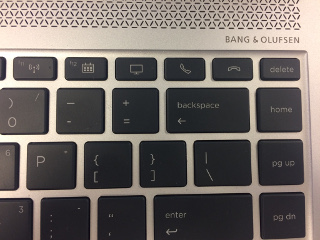
At least there are some extra keys on the keyboard I don’t use (pickup and hangup the telephone), so I decided to map one of those keys to create an insert key.
How to recognize the key
First I had to find out which keycode the key generated. Luckily it wasn’t mapped at all, so syslog mentioned the following when I pressed the hangup-key:
kernel: [ 2455.465336] atkbd serio0: Unknown key pressed (translated set 2, code 0x65 on isa0060/serio0).
kernel: [ 2455.465342] atkbd serio0: Use 'setkeycodes 65 <keycode>' to make it known.
kernel: [ 2455.555867] atkbd serio0: Unknown key released (translated set 2, code 0x65 on isa0060/serio0).
kernel: [ 2455.555868] atkbd serio0: Use 'setkeycodes 65 <keycode>' to make it known.
Then I looked at the Archwiki and followed some of the steps. But the location of the default hwdb.d files in xubuntu is in /lib/udev/hwdb.d, which is different from Arch Linux. The default keyboard file (/lib/udev/hwdb.d/60-keyboard.hwdb) has a description how to update the udev config.
I manually tried to set the value with
setkeycodes 65 110Permanent solution
The Archwiki mentions the udevadm commands need the correct /dev/input/event* file to reload the config. To find the correct file I looked at the output of evemu-describe (from the evemu-tools package) and found /dev/input/event3.
# evemu-describe
Available devices:
/dev/input/event0:      Sleep Button
/dev/input/event1:      Lid Switch
/dev/input/event2:      Power Button
/dev/input/event3:      AT Translated Set 2 keyboard
/dev/input/event4:      Video Bus
/dev/input/event5:      AlpsPS/2 ALPS GlidePoint
/dev/input/event6:      HP Wireless hotkeys
/dev/input/event7:      HP WMI hotkeys
/dev/input/event8:      HDA Intel PCH Mic
/dev/input/event9:      HDA Intel PCH Headphone
/dev/input/event10:     HDA Intel PCH HDMI/DP,pcm=3
/dev/input/event11:     HDA Intel PCH HDMI/DP,pcm=7
/dev/input/event12:     HDA Intel PCH HDMI/DP,pcm=8
/dev/input/event13:     HDA Intel PCH HDMI/DP,pcm=9
/dev/input/event14:     HDA Intel PCH HDMI/DP,pcm=10
/dev/input/event15:     HP HD Camera: HP HD Camera
/dev/input/event16:     HP HD Camera: HP IR Camera
/dev/input/event17:     ALP0013:00 044E:120A Mouse
/dev/input/event18:     ALP0013:00 044E:120A Touchpad
/dev/input/event19:     ALP0013:00 044E:120A UNKNOWN
/dev/input/event20:     ALP0013:00 044E:120A UNKNOWN
Select the device event number [0-20]:
I created a new file (/etc/udev/hwdb.d/90-keyboard.hwdb) which contains the configuration which will be loaded on every boot.
evdev:atkbd:dmi:bvn*:bvr*:bd*:svnHewlett-Packard*:pn*:pvr*
evdev:atkbd:dmi:bvn*:bvr*:bd*:svnHewlett-Packard*:pn*Compaq*:pvr*
evdev:atkbd:dmi:bvn*:bvr*:bd*:svnHewlett-Packard*:pn*EliteBook*:pvr*
evdev:atkbd:dmi:bvn*:bvr*:bd*:svnHewlett-Packard*:pn*2230s*:pvr*
evdev:atkbd:dmi:bvn*:bvr*:bd*:svnHP*:pn*:pvr*
 KEYBOARD_KEY_65=insert
The lines that start with evdev: I copied from the original 60-keyboard.hwdb file.
Then I ran the commands mentioned in the original keyboard.hwdb file to update udev.
udevadm hwdb --update
udevadm trigger /dev/input/event3
Unfortunately the shift-insert combo I normally use to paste selected text in a webbrowser does not (yet) work.
Update:
When I was editing a keyboard shortcut in xubuntu, I noticed that the key actually generates Ctrl+Alt+Insert, so that might be the cause that it does not work in a webbrowser or midnight commander.