Untagged port seems broken
I bought a netgear prosafe GS108T switch to start using VLAN’s in my network. But when I tested the device, it seemed to me that it would not work when a port was set as untagged (or access port as it is called in some devices).
Even though a port is set to be untagged in a certain VLAN the netgear switch will treat the traffic as if it is received from that VLAN. In my opinion this is strange, because other switches I used, worked that way.
Use PVID
Finally, I found a site which explaines what the issue is. On the netgear equipment you have to use PVID to put the untagged port in the correct VLAN. Or as the site describes:
PVID is short for Port VLAN identifier.
The PVID of a port is the VLAN id that will be assigned to any untagged frames entering the switch on that port (assuming the switch is using port-based VLAN classification). This is a concept that is defined in IEEE 802.1Q.
A thread on the cisco site also shows some insight on the different names which are used for access, trunk, untagged, tagged or PVID ports.
So in order to get the functionality I want, I have to configure a port to be untagged for that VLAN. See the picture below where port 4 is untagged for VLAN 103.
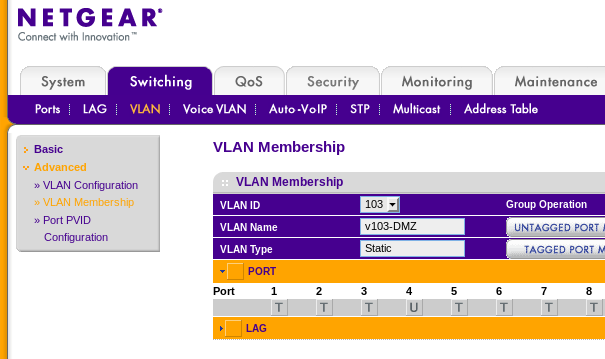
After that is done, the PVID for port 4 has to be set to VLAN 103. See the picture below where port g4 has been set to VLAN 103.
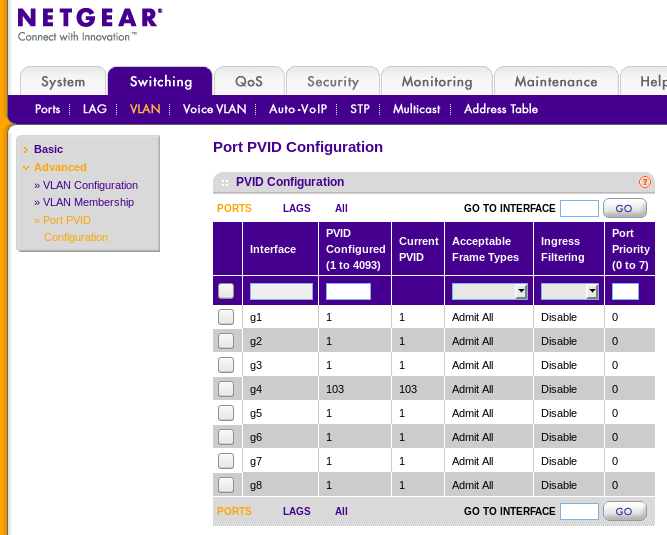
This creates the situation where you can connect a normal device (which has no knowledge about VLANs) to port 4 and it will automaticly speak in VLAN 103.