No insert key
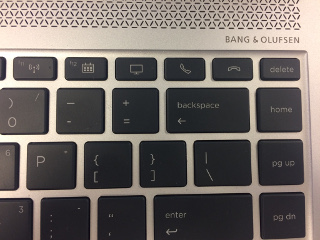
At my work I got a new laptop (HP Elitebook 1040
G4),
which has a great performance, but is missing an insert key.
![]()
At least there are some extra keys on the keyboard I don’t use (pickup
and hangup the telephone), so I decided to map one of those keys to
create an insert key.
How to recognize the key
First I had to find out which keycode the key generated. Luckily it
wasn’t mapped at all, so syslog mentioned the following when I pressed
the hangup-key:
kernel: [ 2455.465336] atkbd serio0: Unknown key pressed (translated set 2, code 0x65 on isa0060/serio0).
kernel: [ 2455.465342] atkbd serio0: Use 'setkeycodes 65 <keycode>' to make it known.
kernel: [ 2455.555867] atkbd serio0: Unknown key released (translated set 2, code 0x65 on isa0060/serio0).
kernel: [ 2455.555868] atkbd serio0: Use 'setkeycodes 65 <keycode>' to make it known.
Then I looked at the
Archwiki
and followed some of the steps.
But the location of the default hwdb.d files in xubuntu is in
/lib/udev/hwdb.d, which is different from Arch Linux.
The default keyboard file (/lib/udev/hwdb.d/60-keyboard.hwdb) has a
description how to update the udev config.
I manually tried to set the value with
which resulted in a insert key in the terminal window.