TODO

FreeNAS 9.3 installation - part 2

3 minute read Published:

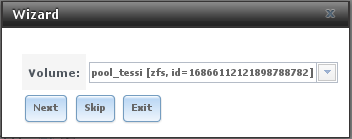
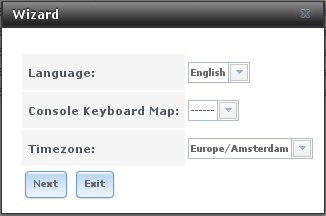
Using the wizard After the installation via a console, the rest of the setup is done via a webinterface (GUI). When visiting the website you need to login with the user root and the password you entered during the installation. Then a installation wizard will be shown. If you press exit during any step of the wizard, it will not apply any of the settings you set. When you install FreeNAS on a system which already has a ZFS pool, the wizard will allow you to import this pool.

IPMI SOL

1 minute read Published:

A new blog post by me.
IPMI SOL: http://www.alleft.com/sysadmin/ipmi-sol-inexpensive-remote-console/

deluge in a FreeNAS jail

1 minute read Published:

https://forums.freenas.org/index.php?threads/freenas-and-deluge.12305/ https://dysphunkional.wordpress.com/freebsd/jails/deluge/ https://dysphunkional.wordpress.com/freebsd/command-line-tips/#ports because of a new version of gettext the old version has to be removed https://forums.freebsd.org/threads/broken-ports-via-upgrade.49423/#post-276597 Starting fails with: “Protocol not supported” http://forums.nas4free.org/viewtopic.php?t=5418 Creating a plugin: http://www.freenas.org/whats-new/2013/04/freenas-plugins-everything-you-ever-wanted-to-know.html

Change the prompt for production systems

1 minute read Published:

At my job all new systems have the string “-prd-” in the hostname. … http://stackoverflow.com/questions/229551/string-contains-in-bash Compatible answer The [i]path[/i] function is a fix for a problem in some sh shells. [code]path() { if test -x /usr/bin/$1 ; then ${1+"/usr/bin/$@"} elif test -x /bin/$1 ; then ${1+"/bin/$@"} fi } Colored production prompt if test -z “${HOSTNAME##-prd-}” -a -t; then _bred="$(path tput bold 2> /dev/null; path tput setaf 1 2> /dev/null)" _sgr0="$(path tput sgr0 2> /dev/null)" # Only set the color if it is not set yet if test -n “${PS1##$_bred}”; then PS1="[$_bred]$PS1[$_sgr0]" fi unset _bred _sgr0 fi [/code]
OS X time machine backup to NAS

1 minute read Published:

http://code.stephenmorley.org/articles/time-machine-on-a-network-drive/ http://wiki.qnap.com/wiki/How_to_setup_your_QNAP_NAS_with_Apple_Time_Machine HN=hostname | cut -f1 -d.;MA=ifconfig en0 | egrep ether | sed "s|:||g" | cut -f2 -d' ';hdiutil create -size 450g -fs HFS+J -volname “TM_$HN” $HN_$MA.sparsebundle alanna:~ stefan$ HN=hostname | cut -f1 -d.;MA=ifconfig en0 | egrep ether | sed "s|:||g" | cut -f2 -d' ';hdiutil create -size 350g -fs HFS+J -volname “TM_$HN” $HN_$MA.sparsebundle created: /Users/stefan/alanna_80e650223d42.sparsebundle alanna:~ stefan$ select time machine backup rsync -aE alanna_80e650223d42.sparsebundle /Volumes/alanna/ rm -rf alanna_80e650223d42.sparsebundle
Recent posts
- full list -